
Affordable Bluetooth Digital Drawing Tablets
Professional recommendations from a Cheshire-based illustrator
🎨 Introduction
As a professional illustrator based in Cheshire, I create custom illustrations for books, branding, and digital media. Over the years, I've tested and researched various digital art tools to help fellow artists make informed decisions.
This guide covers the top-rated options for affordable Bluetooth digital drawing tablets. Each product has been selected based on detailed research — examining verified customer reviews, technical specifications, pressure sensitivity, screen quality, and value for money. The recommendations reflect what I'd look for when advising clients and students on digital art equipment.
This page contains affiliate links. As an Amazon Associate, we may earn from qualifying purchases at no extra cost to you.
⏳ In a Rush? Our Top Picks
Based on detailed research and customer feedback, here are our award winners:


🏆 Recommended Products

1. Bluetooth Drawing Tablet GAOMON WH851 8 x 5
The Bluetooth Drawing Tablet GAOMON WH851 8 x 5 is for beginners and hobbyists, the gaomon wh851 offers a solid entry into digital illustration, balancing affordability with essential features. The GAOMON WH851 is well-suited for budding illustrators or hobbyists who need a portable solution for digital sketching and basic illustration work.
✅ Pros
- High pressure sensitivity with 16,384 levels.
- Portable and lightweight design.
- Affordable price point.
- Supports major graphic software.
❌ Cons
- Limited active area for detailed work.
- Driver issues on Mac systems.
- Stiff shortcut keys can hinder workflow.
👁️ Quick Review Summary
⚡ Performance
With 16,384 pressure sensitivity levels, the GAOMON WH851 offers a surprising level of control for a budget-friendly tablet. This makes it suitable for detailed work, allowing for varied line weights and subtle shading. The active area of 8 x 5 inches provides a reasonable workspace for most tasks, although some users have mentioned that it feels cramped for more detailed work. The pen's accuracy is generally praised, though a few users have noted occasional hiccups in responsiveness.
🎨 Design
The GAOMON WH851 is constructed from durable plastic, making it lightweight and easy to carry. Its design is minimalistic, which appeals to users who prefer functionality over flashy aesthetics. The tablet's ergonomic design, coupled with its intuitive dial and eight shortcut keys, allows for efficient workflow adjustments. However, some users have reported that the keys can feel stiff and require a bit of pressure to activate, which might be a slight inconvenience during extended use.
🔌 Compatibility
This tablet is compatible with Windows, Android, and Mac, offering flexibility for various users. It supports major software like Photoshop, Illustrator, and Clip Studio Paint, which is crucial for digital artists. The presence of a Type-C port ensures reliable connectivity. However, some users have encountered driver installation issues, especially on Mac systems, which can be frustrating. The express keys and dial are generally well-received for customisation and ease of access.
💰 Value
At £49.99, the GAOMON WH851 offers a competitive set of features for its price. It's an excellent choice for beginners or those with budget constraints who need a reliable tool for digital art. However, professional illustrators requiring larger working areas or more advanced features might find it lacking. For those prioritising portability and affordability, this tablet provides good value. Conversely, professionals might want to invest in a higher-end model for more demanding tasks.
🎯 Verdict
For beginners and hobbyists, the GAOMON WH851 offers a solid entry into digital illustration, balancing affordability with essential features.
2. Wacom Intuos S Black
The Wacom Intuos S Black is for aspiring illustrators seeking an economical entry into digital art, the wacom intuos s is a practical choice, though it may fall short for more demanding professional use. The Wacom Intuos S Black with Bluetooth is a suitable choice for budding illustrators and hobbyists looking to explore digital art.
✅ Pros
- Affordable price for beginners
- Bluetooth connectivity for wireless use
- Compact and portable design
- Compatible with major operating systems and software
❌ Cons
- Limited pressure sensitivity compared to higher-end models
- Occasional driver issues reported
- Small active area may not suit detailed work
👁️ Quick Review Summary
⚡ Performance
According to customer feedback, the Wacom Intuos S offers a reliable performance with its 4096 levels of pressure sensitivity, which provides decent control over line thickness and shading. The active area of 152 x 95 mm is compact, making it more suitable for smaller tasks rather than expansive illustrations. Users report that the pen is accurate, though some suggest it may not match the precision required for intricate work. As a non-display tablet, screen quality is not applicable.
🎨 Design
The tablet's design is praised for its lightweight and portable nature, weighing only 250 grams, making it easy to carry for on-the-go work. The build is primarily plastic, which is expected at this price point, yet it feels sturdy enough for regular use. The ergonomics are generally comfortable, though some users mention that extended use can become slightly tiring due to its small size. The sleek black finish gives it a professional look.
🔌 Compatibility
The Wacom Intuos S is compatible with Windows, Mac, and Android devices, which is beneficial for artists using various platforms. It supports major software like Photoshop, Illustrator, and Clip Studio Paint, though users have noted occasional driver issues that require updates or reinstallation. The tablet includes Bluetooth connectivity, eliminating the need for constant wired connections, and features four express keys for custom shortcuts.
💰 Value
At £49.99, the Wacom Intuos S offers good value for beginners or casual artists. It provides essential features without overwhelming users with complexity or high costs. However, professionals or those requiring high precision and larger work areas might find it lacking. For those needing a budget-friendly entry into digital illustration, this tablet is a commendable option.
🎯 Verdict
For aspiring illustrators seeking an economical entry into digital art, the Wacom Intuos S is a practical choice, though it may fall short for more demanding professional use.

3. XPPen Deco MW Wireless Drawing Tablet 8 x
The XPPen Deco MW Wireless Drawing Tablet 8 x is the xppen deco mw is a practical choice for illustrators on a budget who value portability and flexibility, though it may not meet the needs of high-end professionals. The XPPen Deco MW Wireless Drawing Tablet is aimed at illustrators who seek a budget-friendly option for digital sketching, concept art, and graphic design.
✅ Pros
- 8192 levels of pressure sensitivity for detailed control.
- Wireless connectivity for a flexible workspace.
- Broad compatibility with multiple operating systems.
- Eight customisable shortcut keys to improve workflow.
❌ Cons
- Build may feel slightly plasticky to some users.
- Occasional driver issues reported, especially on Mac OS.
- Lacks a built-in display, which may deter some professionals.
👁️ Quick Review Summary
⚡ Performance
The Deco MW offers 8192 levels of pressure sensitivity, which customer feedback suggests provides a responsive drawing experience that can handle subtle variations in line weight. The X3 Elite Stylus is praised for its accuracy, with users noting minimal lag and good control. While it lacks a display, the active area of 8 x 5 inches is reported to be sufficient for detailed work without being cumbersome. Overall, the performance is considered reliable for its price point.
🎨 Design
Constructed with lightweight materials, the Deco MW is designed for portability, making it easy to carry along to various work locations. The build is described as sturdy, though some users have mentioned that it feels slightly plasticky. Ergonomically, the tablet includes eight customisable shortcut keys, which are well-received for enhancing workflow efficiency. Its sleek black finish gives it a professional look, though some may find it lacking in unique aesthetic flair.
🔌 Compatibility
The Deco MW is compatible with a broad range of operating systems, including Windows, Mac, Android, Chrome OS, and Linux, which is a significant advantage for users across different platforms. It supports major software like Photoshop, Illustrator, and Clip Studio Paint, although some customer reviews mention occasional driver issues, particularly with Mac OS. The wireless connectivity is noted to be stable, allowing for a clutter-free workspace.
💰 Value
At £79.99, the Deco MW offers a good balance of features for the price, especially for beginners or intermediate artists. The wireless feature and broad compatibility make it appealing to those who require versatility and mobility. However, professionals seeking high-end performance or a built-in display might want to consider other options. Overall, it's a solid choice for budget-conscious illustrators who prioritise portability and ease of use.
🎯 Verdict
The XPPen Deco MW is a practical choice for illustrators on a budget who value portability and flexibility, though it may not meet the needs of high-end professionals.

4. HUION Inspiroy Frego Medium Wireless Drawing Tablet
The HUION Inspiroy Frego Medium Wireless Drawing Tablet is for illustrators seeking a versatile and portable drawing tablet without breaking the bank, the huion inspiroy frego is a commendable choice. The HUION Inspiroy Frego Medium Wireless Drawing Tablet is designed for illustrators and digital artists who require a balance between portability and functionality.
✅ Pros
- 8192 pressure levels for precise control
- Wireless Bluetooth connectivity for flexibility
- Compatible with Windows, Mac, Android, and Linux
- Customisable express keys to enhance workflow
❌ Cons
- Occasional Bluetooth lag reported
- Plastic build may feel less durable
- Driver issues on Linux systems
👁️ Quick Review Summary
⚡ Performance
The tablet features 8192 levels of pressure sensitivity, providing fine control for detailed work. Customer reviews suggest that the pen accuracy is commendable, though some mention a slight lag in Bluetooth mode. The active area of 10 x 6.25 inches offers ample space for intricate illustrations without feeling cramped. While it lacks a screen, users have noted that this is not a significant drawback given the tablet's price point and intended use.
🎨 Design
The Inspiroy Frego is constructed with lightweight materials that enhance its portability, weighing just 666 grams. Customer feedback indicates that the design is sleek and modern, though some find the plastic build less robust than metal alternatives. Ergonomically, the tablet is comfortable for extended use, with a slim profile that fits easily into a backpack. Its aesthetic appeal is understated, catering to professionals who prefer a minimalist look.
🔌 Compatibility
This tablet boasts broad compatibility, supporting Windows, Mac, Android, and Linux systems. It works well with major software like Photoshop, Illustrator, and Clip Studio Paint, though some users report occasional driver issues on Linux. The tablet includes express keys, which can be customised to enhance workflow efficiency. Connectivity options include both USB and Bluetooth, with the latter offering greater flexibility but sometimes at the expense of response time.
💰 Value
Priced at £89.99, the HUION Inspiroy Frego offers good value for budget-conscious artists who need a reliable tablet for everyday illustration tasks. It is best suited for those who prioritise portability and wireless functionality. However, artists requiring a built-in display or more robust construction may need to consider higher-end models. Overall, it provides a solid feature set for its price, making it an attractive option for students and hobbyists.
🎯 Verdict
For illustrators seeking a versatile and portable drawing tablet without breaking the bank, the HUION Inspiroy Frego is a commendable choice.
5. Wacom One S pen tablet incl. battery-free EMR-pen
The Wacom One S pen tablet incl. battery-free EMR-pen is for beginners and casual users, the wacom one s provides an accessible and budget-friendly introduction to digital illustration. The Wacom One S pen tablet is ideally suited for budding illustrators and hobbyists exploring digital art for the first time.
✅ Pros
- Lightweight and portable design
- Battery-free pen eliminates charging needs
- Compatible with multiple operating systems
- Affordable entry-level option
❌ Cons
- Limited active area for detailed work
- Occasional driver update issues
- Lacks express keys for customisation
👁️ Quick Review Summary
⚡ Performance
With 4096 levels of pressure sensitivity, the Wacom One S offers an adequate range for beginners to experiment with line variation and shading. The active area measures 152 x 95 mm, which is compact and may be limiting for those used to larger surfaces but is sufficient for small-scale work. Customer reviews highlight the pen’s accuracy as satisfactory for its class, though it may not rival higher-end models. The lack of a screen means users will need to adapt to drawing while looking at a separate monitor.
🎨 Design
Constructed from durable plastic, the Wacom One S is lightweight and easily portable, weighing just 240g. Its minimalist design appeals to those who value aesthetics, with a simple, unobtrusive black finish. Ergonomically, it fits comfortably on a desk or in a bag, though some users note that the compact size may feel cramped during extended use. The battery-free EMR pen is a practical choice, eliminating the need for charging and offering a reliable drawing experience.
🔌 Compatibility
The Wacom One S is compatible with Windows, Mac, Chromebook, and Android systems, making it versatile for various users. It supports major creative software like Adobe Photoshop, Illustrator, and Clip Studio Paint, though users report occasional driver updates are needed for optimal performance. The inclusion of Bluetooth connectivity adds convenience, although some users experience connectivity issues. It lacks express keys, which could hinder workflow customisation for advanced users.
💰 Value
Priced at £97.99, the Wacom One S offers a fair entry point for beginners interested in digital art. Its features justify the cost for those starting out or needing a secondary device for simple tasks. However, more advanced artists might find the lack of express keys and smaller active area limiting. Those requiring a more extensive range of features or larger workspace should explore higher-tier models. For its price, it serves as a capable tool for its intended audience.
🎯 Verdict
For beginners and casual users, the Wacom One S provides an accessible and budget-friendly introduction to digital illustration.
6. Wacom One S pen tablet incl. battery-free EMR-pen
The Wacom One S pen tablet incl. battery-free EMR-pen is a practical choice for beginners or casual users exploring digital illustration, though professionals may need more advanced features. The Wacom One S pen tablet is designed for budding illustrators and creative beginners venturing into digital art.
✅ Pros
- Affordable entry-level option
- Broad compatibility with devices and software
- Battery-free EMR pen
- Lightweight and portable design
❌ Cons
- Limited pressure sensitivity compared to higher-end models
- No built-in screen
- Occasional Bluetooth connectivity issues
👁️ Quick Review Summary
⚡ Performance
Customer feedback highlights the Wacom One S's 4096 pressure sensitivity levels, which offer a decent range for beginners to explore line variation and shading. The active area of 152 x 95 mm provides a modest space for drawing, suitable for small-scale works. The battery-free EMR pen is noted for its accuracy, though some users mention a slight lag. While it lacks a screen, it remains functional for basic digital tasks, aligning well with its entry-level positioning.
🎨 Design
Constructed from durable plastic, the Wacom One S is lightweight and portable, making it easy to carry for on-the-go creativity. Its minimalistic design appeals to users who prefer a clean aesthetic. Reviews praise its ergonomic shape, which supports comfortable use over extended periods. However, the absence of a built-in stand may require users to find alternative solutions for optimal positioning during use.
🔌 Compatibility
The tablet offers broad compatibility with major software such as Photoshop, Illustrator, and Clip Studio Paint, ensuring it meets the needs of most digital artists. Driver support is generally reliable, though some users report occasional connectivity issues via Bluetooth. The lack of express keys might be a limitation for those accustomed to quick access shortcuts, but it simplifies the design for beginners.
💰 Value
Priced at £101.10, the Wacom One S offers good value for beginners seeking a reliable introduction to digital art. Its features justify the cost for novices or casual users. However, professional illustrators or those requiring advanced features might find it lacking. For more demanding tasks, users should consider higher-end models with enhanced capabilities.
🎯 Verdict
A practical choice for beginners or casual users exploring digital illustration, though professionals may need more advanced features.

7. XP-PEN Deco Pro MW Graphic Drawing Tablet 11"×
The XP-PEN Deco Pro MW Graphic Drawing Tablet 11"× is for illustrators seeking an affordable, feature-rich tablet without a display, the deco pro mw offers solid performance and versatility, though it requires careful handling and occasional driver tweaks. The XP-PEN Deco Pro MW is designed for freelance illustrators and hobbyists who require a wireless drawing tablet for sketching, digital painting, and detailed line work.
✅ Pros
- 8192 pressure sensitivity levels for detailed control
- Wireless connectivity for flexible use
- Compatible with multiple operating systems
- Customisable shortcut keys and dial wheels
❌ Cons
- Surface prone to scratches
- Occasional driver issues reported
- No built-in display screen
👁️ Quick Review Summary
⚡ Performance
The Deco Pro MW features 8192 pressure sensitivity levels, allowing for nuanced control over line weight and opacity, which is crucial for detailed illustration work. The active area of 11" x 6" is spacious enough for most projects, though it might feel limiting for highly detailed or large-scale pieces. According to user feedback, the pen accuracy is commendable, with minimal lag and jitter, making it reliable for precision tasks. While not a screen tablet, the surface provides a paper-like texture that enhances the drawing experience.
🎨 Design
The tablet's build combines a sleek aluminium alloy body with a distinctive black and silver colour scheme, providing an aesthetic appeal that many reviewers appreciate. It is relatively lightweight, making it portable for on-the-go artists. The ergonomic design includes 8 customisable shortcut keys and 2 dial wheels, which users find enhance workflow efficiency. However, some customers mention that the surface can be prone to scratches, necessitating careful handling.
🔌 Compatibility
The Deco Pro MW supports a wide range of operating systems including Windows, Mac OS, Android, Chrome OS, and Linux, making it highly versatile. It is compatible with major software like Photoshop, Illustrator, and Clip Studio Paint, ensuring it fits into most digital artists' workflows. The inclusion of 8 express keys and 2 dial wheels allows for customisation, although some users report occasional driver issues that require troubleshooting.
💰 Value
At £119.99, the XP-PEN Deco Pro MW offers a compelling set of features for its price. It is ideal for emerging artists and those on a budget who need a reliable and versatile tablet. However, professionals seeking a display tablet or those requiring ultra-high precision might consider investing in higher-end models. Overall, it balances performance and cost effectively.
🎯 Verdict
For illustrators seeking an affordable, feature-rich tablet without a display, the Deco Pro MW offers solid performance and versatility, though it requires careful handling and occasional driver tweaks.

8. Wacom One M pen tablet incl. battery-free EMR-pen
The Wacom One M pen tablet incl. battery-free EMR-pen is for those entering the world of digital illustration, the wacom one m offers a commendable balance of functionality and affordability, though professionals may seek more advanced features. The Wacom One M pen tablet is tailored for budding illustrators and creative enthusiasts venturing into digital art.
✅ Pros
- High pressure sensitivity with 8192 levels
- Bluetooth connectivity for wire-free use
- Wide compatibility with various operating systems
- Ergonomic design suitable for long sessions
❌ Cons
- No built-in display for direct drawing
- Lacks express keys for quick shortcuts
- Requires driver updates for optimal performance
👁️ Quick Review Summary
⚡ Performance
The Wacom One M offers 8192 pressure sensitivity levels, providing a nuanced response for varying line weights and styles, crucial for detailed illustration work. The active area measures approximately 8.5 x 5.3 inches, offering ample space for drawing without being cumbersome. Customer feedback highlights the pen's accuracy as reliable, though some note a slight learning curve in achieving precision. The lack of a display means screen quality is not applicable, but it connects to external displays seamlessly.
🎨 Design
Constructed from durable plastic, the Wacom One M is lightweight and portable, making it easy to transport between workspaces. Reviews suggest its ergonomic design is comfortable for extended use, though some users mention it's best used on a flat surface to prevent wrist strain. Its minimalist aesthetic, with a simple black finish, appeals to those who prefer a clean and professional look without unnecessary embellishments.
🔌 Compatibility
The Wacom One M is compatible with Windows, Mac, Chromebook, and Android, providing flexibility across platforms. It supports major software like Photoshop, Illustrator, and Clip Studio Paint, though users should ensure they install the latest drivers for optimal performance. Bluetooth connectivity is a convenient feature, eliminating cable clutter. However, it lacks express keys, which may be a limitation for those accustomed to shortcut-rich workflows.
💰 Value
At £123.51, the Wacom One M offers a balanced mix of features for the price. It is a solid choice for beginners and those on a budget looking for a dependable entry into digital illustration. However, professional artists or those seeking advanced features may need to consider higher-end options. The absence of express keys and a built-in screen might deter those requiring these features.
🎯 Verdict
For those entering the world of digital illustration, the Wacom One M offers a commendable balance of functionality and affordability, though professionals may seek more advanced features.

9. XPPen Deco Pro MW Wireless Graphics Tablet
The XPPen Deco Pro MW Wireless Graphics Tablet is for illustrators who value portability and precision without the need for an integrated display, the xppen deco pro mw is a solid choice, though connectivity and driver issues should be considered. The XPPen Deco Pro MW (Gen 2) is well-suited for illustrators who require a balance between portability and functionality, making it ideal for those working on book illustrations, branding projects, and digital media.
✅ Pros
- 16,000 levels of pressure sensitivity for precise control.
- Bluetooth 5.0 supports stable wireless connectivity.
- Lightweight and portable design for easy transportation.
- Compatible with major illustration software like Photoshop.
❌ Cons
- Lack of built-in display requires external monitor use.
- Occasional Bluetooth connectivity issues reported.
- Driver installation can be tricky for some users.
👁️ Quick Review Summary
⚡ Performance
With 16,000 levels of pressure sensitivity, the XPPen Deco Pro MW ensures fine control over line thickness, shading, and texture, which is crucial for detailed illustrations. The 9"x 6" active area provides ample space for most digital tasks, though it may feel slightly limited for large-scale projects. Customer feedback highlights the X3 Pro Stylus as accurate and responsive, making it suitable for intricate work. The lack of a display means reliance on an external monitor, which some users find less intuitive.
🎨 Design
The tablet's build quality is praised for its sleek and modern aesthetic, with durable materials that withstand regular use. Its slim profile and lightweight design enhance portability, making it a practical choice for artists who work in various locations. Ergonomically, the tablet is comfortable for extended use, though some users mention the absence of a built-in stand, which could improve the drawing angle. The minimalist design appeals to those who prefer a clean, unobtrusive workspace.
🔌 Compatibility
The Deco Pro MW supports major operating systems like Windows and macOS, and it is compatible with popular software such as Photoshop, Illustrator, and Clip Studio Paint. The inclusion of Bluetooth 5.0 ensures a stable wireless connection, although some users report occasional connectivity issues. The tablet features express keys, which are customisable and improve workflow efficiency. However, driver installation can be challenging for some, with users recommending manual updates for optimal performance.
💰 Value
Priced at £127.49, the XPPen Deco Pro MW offers good value for illustrators seeking a wireless tablet with high pressure sensitivity and a decent active area. It's a solid choice for those who prioritise portability and wireless functionality. However, artists needing a built-in display or larger workspace might need to consider alternative options. The tablet is ideal for those who are comfortable with external monitors and require a reliable pen performance.
🎯 Verdict
For illustrators who value portability and precision without the need for an integrated display, the XPPen Deco Pro MW is a solid choice, though connectivity and driver issues should be considered.
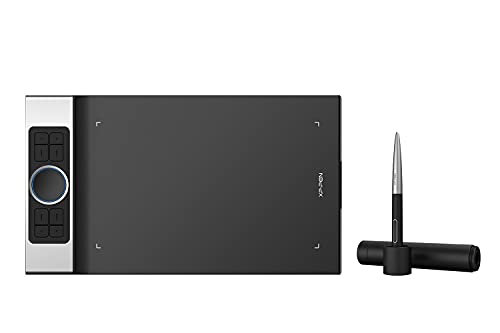
10. Tablette Graphique Deco Pro M Wireless Xp-Pen Stylet
The Tablette Graphique Deco Pro M Wireless Xp-Pen Stylet is the deco pro m wireless is a solid choice for illustrators seeking a reliable, feature-rich tablet without breaking the bank. The XP-Pen Deco Pro M Wireless is aimed at illustrators who require a versatile, mid-range graphics tablet for digital art creation, including book illustrations, branding work, and digital media.
✅ Pros
- 8192 pressure levels for precise control
- Large active area for detailed work
- Wireless connectivity for flexible use
- Customisable express keys for efficiency
❌ Cons
- No integrated screen limits precision
- Occasional wireless connectivity issues
- Not ideal for left-handed use without adjustments
👁️ Quick Review Summary
⚡ Performance
The Deco Pro M Wireless boasts 8192 levels of pressure sensitivity, offering fine-tuned control over brush strokes, essential for detailed illustration. The active area measures 11 x 6 inches, providing ample space for creativity while maintaining portability. Customer reviews suggest the pen is accurate and responsive, though some note a learning curve with pressure adjustment. While it lacks a screen, this model is praised for its precise input, making it a reliable choice for digital drawing and painting.
🎨 Design
The tablet features a sleek aluminium casing, lending it a sturdy and professional feel. Its ergonomic design includes a tilted surface for comfortable drawing sessions, though some users mention it might not suit left-handed artists as intuitively. Weighing around 1.3 kg, it's portable enough for travel yet solid enough for a dedicated workspace. The tablet’s aesthetic is modern and minimalist, appealing to those who appreciate a streamlined setup.
🔌 Compatibility
The Deco Pro M Wireless supports major design software such as Adobe Photoshop, Illustrator, and Clip Studio Paint. It includes eight customisable express keys and a double wheel interface, enhancing workflow efficiency. Connectivity is flexible, offering both USB and Bluetooth options, though some users report occasional connectivity issues with wireless mode. The drivers are generally reliable, but a few customers note the need for manual updates to ensure compatibility with newer software versions.
💰 Value
Priced at £140.17, the Deco Pro M Wireless offers solid features for its cost, making it a worthwhile investment for illustrators who need a dependable mid-range tablet. It’s particularly attractive to those who value wireless freedom and a generous drawing area. However, professionals requiring the precision of an integrated display or those who frequently switch between software might find the lack of a screen limiting. Beginners and intermediate artists will find this tablet offers excellent value for the price.
🎯 Verdict
The Deco Pro M Wireless is a solid choice for illustrators seeking a reliable, feature-rich tablet without breaking the bank.

11. XPPen Deco Pro LW Wireless Drawing Tablet
The XPPen Deco Pro LW Wireless Drawing Tablet is for illustrators seeking a portable and versatile drawing tablet, the xppen deco pro lw offers a compelling mix of features at an accessible price point. The XPPen Deco Pro LW (Gen 2) is a suitable choice for illustrators who require a portable and versatile drawing tablet for tasks such as book illustrations, branding projects, and digital media creation.
✅ Pros
- 8192 pressure levels for detailed work
- Large active area for diverse drawing styles
- Wireless connectivity for convenience
- Broad compatibility with major operating systems
❌ Cons
- No built-in screen limits direct drawing feedback
- Occasional connectivity issues with the shortcut remote
- Shortcut remote could be more intuitive
👁️ Quick Review Summary
⚡ Performance
With 8192 levels of pressure sensitivity, the XPPen Deco Pro LW offers a high degree of control and nuance, essential for detailed illustrations. The active area of 11 x 6 inches provides ample space for a wide range of drawing styles. Customer feedback highlights the accuracy of the stylus, which is crucial for intricate work. Although it lacks a screen, the tablet's responsiveness is often praised, making it a reliable tool for digital artists working across different software platforms.
🎨 Design
The tablet's build quality is generally well-received, with a sleek aluminium casing that adds to its durability and aesthetic appeal. Its thin profile and light weight contribute to its portability, making it easy to carry in a backpack or laptop bag. Ergonomically, the tablet is designed to be comfortable for extended use, though some users note that the shortcut remote could be more intuitive. Overall, it appeals to those who appreciate both form and function.
🔌 Compatibility
The XPPen Deco Pro LW is compatible with Windows, macOS, Android, Chromebook, and Linux, ensuring broad usability. It supports major design software like Photoshop, Illustrator, and Clip Studio Paint, making it versatile for professional use. The inclusion of a shortcut remote is a plus, though some users have reported occasional connectivity issues. The wireless feature is appreciated for reducing cable clutter, enhancing the workspace's tidiness.
💰 Value
Priced at £144.49, the XPPen Deco Pro LW offers good value for its features, particularly for those who need a portable and versatile drawing solution. It is well-suited for freelance illustrators and students who need a reliable tablet without breaking the bank. However, professionals who require a built-in screen or higher-end features might need to consider more expensive options.
🎯 Verdict
For illustrators seeking a portable and versatile drawing tablet, the XPPen Deco Pro LW offers a compelling mix of features at an accessible price point.
12. XPPen Deco Pro XLW Graphics Tablet
The XPPen Deco Pro XLW Graphics Tablet is the xppen deco pro xlw (gen 2) is a solid choice for illustrators needing a large, responsive tablet, though it requires ample workspace and patience during setup. The XPPen Deco Pro XLW (Gen 2) is well-suited for illustrators and digital artists who require a large active area for detailed work, such as book illustrations and branding designs.
✅ Pros
- Large 15 x 9-inch active area for detailed work
- 16,384 pressure levels for nuanced control
- ±60° tilt support for versatile brush effects
- Bluetooth connectivity for a wireless setup
❌ Cons
- Lacks a built-in screen, requiring external monitor
- Setup can be challenging for some users
- Size may not be suitable for limited desk space
👁️ Quick Review Summary
⚡ Performance
With 16,384 pressure levels, the XPPen Deco Pro XLW offers excellent sensitivity, allowing for nuanced strokes and detailed shading. The ±60° tilt support provides additional control, especially beneficial for simulating traditional media techniques. The large active area of 15 x 9 inches is praised in reviews for offering ample space to work comfortably. Although it lacks a screen, the pen accuracy and responsiveness are noted to be commendable, with the stylus X3 Pro delivering consistent performance without noticeable lag.
🎨 Design
Customer feedback highlights the sturdy build quality of the XPPen Deco Pro XLW. The tablet features a sleek, modern design with a silver and black finish that appeals to many users. It's relatively portable for its size, though not as convenient as smaller models for on-the-go use. The ergonomic design includes well-placed express keys and a dial, which users find intuitive and easy to access during work sessions. However, its larger size may require a dedicated workspace.
🔌 Compatibility
The XPPen Deco Pro XLW is compatible with Windows, macOS, and Android, making it versatile for various operating systems. It supports major software like Photoshop, Illustrator, and Clip Studio Paint, which is crucial for professional illustrators. Customer feedback suggests that the driver support is generally reliable, though some users report occasional setup challenges. Bluetooth connectivity is a convenient feature, reducing cable clutter, but a wired option is also available for stable connections.
💰 Value
At £169.99, the XPPen Deco Pro XLW offers a strong feature set for its price, particularly for professionals needing a large working area and high pressure sensitivity. It is a worthwhile investment for illustrators who require precision and space for their projects. However, beginners or those with limited desk space might consider smaller, more affordable options. The tablet's value is most apparent for those who can fully utilise its size and advanced features.
🎯 Verdict
The XPPen Deco Pro XLW (Gen 2) is a solid choice for illustrators needing a large, responsive tablet, though it requires ample workspace and patience during setup.
📖 Buying Guide
When choosing affordable Bluetooth digital drawing tablets, consider these key factors:
- Price vs Features: Budget tablets can still offer 8192 pressure levels and good build quality. Focus on essential features rather than premium extras.
- Screen Quality: Full HD (1920x1080) minimum for professional work. Look for 90%+ sRGB colour gamut. Full lamination reduces parallax for better accuracy.
- Pressure Sensitivity: Look for 8192 levels for professional work. 4096 levels work well for beginners. Higher sensitivity allows for more nuanced brush strokes and line variation.
- Screen Size: 13-16" portable for travel, 22-24" ideal for studio work. Larger screens reduce eye strain and allow for detailed illustration work.
- Connectivity: USB-C offers single-cable solution. HDMI + USB more universal. Check if your computer supports the required connections.
- Stand & Ergonomics: Adjustable stand (15-90°) prevents neck strain. Anti-glare coating reduces eye fatigue during long sessions.
- Software Compatibility: Ensure driver support for your OS (Windows, Mac, Linux). Check compatibility with your preferred software (Photoshop, Illustrator, Clip Studio Paint, etc).

About the Reviewer
Every Big Red Illustration review is written by illustrator and agent Jamie Conner, drawing on over 30 years of combined professional experience in traditional art, digital tools, and the wider creative industry.
Here's what he has to say…
I'm Jamie Conner, a UK-based illustrator and illustrator agent with a background in character-focused and expressive artwork. My training began at Newcastle-under-Lyme College and continued at Nottingham Trent University, where I developed a strong foundation in illustration.
I now split my time between creating my own work and representing artists, supporting them with commissions, opportunities, and navigating the wider creative industry. I also review digital and traditional art products, offering clear, practical insights to help artists choose tools that suit their workflow.
Whether I'm illustrating, advising artists, or reviewing products, my work is driven by a genuine commitment to the craft of illustration and to the wider creative community.