
Premium Digital Art Tablets Under £300
Professional recommendations from a Cheshire-based illustrator
🎨 Introduction
As a professional illustrator based in Cheshire, I create custom illustrations for books, branding, and digital media. Over the years, I've tested and researched various digital art tools to help fellow artists make informed decisions.
This guide covers the top-rated options for premium digital art tablets under £300. Each product has been selected based on detailed research — examining verified customer reviews, technical specifications, pressure sensitivity, screen quality, and value for money. The recommendations reflect what I'd look for when advising clients and students on digital art equipment.
This page contains affiliate links. As an Amazon Associate, we may earn from qualifying purchases at no extra cost to you.
⏳ In a Rush? Our Top Picks
Based on detailed research and customer feedback, here are our award winners:


🏆 Recommended Products
1. XPPen Artist 15.6 Pro V2 Drawing Tablet
The XPPen Artist 15.6 Pro V2 Drawing Tablet is the xppen artist 15. The XPPen Artist 15.
✅ Pros
- High pen pressure sensitivity with 16,384 levels.
- Full-laminated screen with 99% sRGB colour gamut.
- Ergonomic design with a battery-free stylus.
- Compatible with major digital art software.
❌ Cons
- Minor driver installation issues reported.
- Matte screen finish can reduce clarity.
- Screen size might be limiting for some professionals.
👁️ Quick Review Summary
⚡ Performance
The tablet boasts a full-laminated screen with a 99% sRGB colour gamut, which is crucial for accurate colour representation in professional work. The 16,384 levels of pen pressure sensitivity offer nuanced control, allowing for detailed line work and shading. Customers have noted the pen accuracy as a strong point, with minimal lag and good responsiveness. The 15.4-inch active area is ample for most digital art tasks, providing a comfortable space for drawing.
🎨 Design
Constructed with quality materials, the XPPen Artist 15.6 Pro V2 is noted for its robust build. Its ergonomic design includes a tilt function and a battery-free stylus, reducing hand fatigue during long sessions. Portability is a plus, as the device is relatively lightweight, making it easy to transport for on-the-go work. The aesthetic appeal is modern and sleek, though some users have mentioned the screen's matte finish might reduce clarity under certain lighting conditions.
🔌 Compatibility
The tablet offers solid compatibility with both Windows and macOS, supporting major software like Photoshop, Illustrator, and Clip Studio Paint. It includes customisable express keys, which enhance workflow efficiency. Connectivity is straightforward, though some users have reported minor issues with driver installations, necessitating manual updates to ensure optimised performance.
💰 Value
At £297.49, the XPPen Artist 15.6 Pro V2 offers good value for its feature set, particularly for those who need a balance between performance and cost. It's an excellent choice for intermediate illustrators or those transitioning to more serious work. However, professionals who require the highest screen resolution and colour accuracy might need to consider higher-end options.
🎯 Verdict
The XPPen Artist 15.6 Pro V2 offers a compelling mix of performance and portability, making it a solid choice for illustrators seeking a reliable mid-range drawing tablet.

2. GAOMON PD1561 Liquid Tab
The GAOMON PD1561 Liquid Tab is a solid choice for beginners and intermediates, offering essential features for digital illustration at a reasonable price. The GAOMON PD1561 is tailored for budding illustrators venturing into digital media, particularly those working on book illustrations, branding, and digital art projects.
✅ Pros
- 8192 levels of pressure sensitivity for detailed work
- Tilt detection enhances shading techniques
- 10 programmable shortcut keys improve workflow
- Affordable option for beginners and intermediates
❌ Cons
- Colour accuracy may not match higher-end models
- Potential driver installation issues
- Screen calibration may require manual adjustments
👁️ Quick Review Summary
⚡ Performance
With 8192 levels of pressure sensitivity, the GAOMON PD1561 affords a nuanced drawing experience akin to traditional tools. The 15.6-inch display provides ample space for detailed work, though some users note that the screen's colour accuracy might not match higher-end models. The pen is reported to be responsive, with a tilt detection feature that enhances shading techniques. However, some feedback points to occasional calibration discrepancies, which may require manual adjustments.
🎨 Design
Built with practicality in mind, the GAOMON PD1561 boasts a sturdy construction, though it lacks the premium feel of more expensive tablets. Weighing just over 1.5 kg, it is relatively portable but more suited for a dedicated workspace rather than constant travel. The included 10 shortcut keys are strategically placed for easy access, aiding workflow efficiency. Its overall aesthetic is functional, focusing more on utility than visual appeal.
🔌 Compatibility
The tablet supports drivers compatible with Windows and MacOS systems, facilitating integration with popular software such as Photoshop, Illustrator, and Clip Studio Paint. Users report that the express keys are easily programmable, enhancing productivity. Connectivity is straightforward, although some users experience occasional driver installation issues, which might require technical troubleshooting.
💰 Value
At £297.02, the GAOMON PD1561 offers a compelling feature set for its price, making it a worthy consideration for beginners and intermediate artists. While it may not meet the needs of professionals seeking top-tier performance and colour accuracy, it provides a solid foundation for those looking to develop their digital illustration skills without breaking the bank.
🎯 Verdict
A solid choice for beginners and intermediates, offering essential features for digital illustration at a reasonable price.

3. Wacom Intuos M Pistachio-green
The Wacom Intuos M Pistachio-green is for illustrators seeking a reliable, pressure-sensitive tablet without the need for a built-in screen, the wacom intuos m is a solid choice with a reasonable price point. The Wacom Intuos M Pistachio-green with Bluetooth is well-suited for budding illustrators and digital artists who focus on book illustrations, branding projects, and digital media.
✅ Pros
- 8192 pressure sensitivity levels for detailed work
- Compact and lightweight design for easy portability
- Bluetooth connectivity for wireless convenience
- Compatible with major software like Photoshop and Illustrator
❌ Cons
- No built-in screen for direct drawing
- Bluetooth connectivity can be unreliable
- Surface may feel slippery for some users
👁️ Quick Review Summary
⚡ Performance
With 8192 levels of pressure sensitivity, the Wacom Intuos M offers precise control over line thickness and opacity, crucial for detailed illustrations. The active area measures 216 x 135 mm, providing ample space for most drawing tasks. Customers have noted the pen's accuracy, which enhances the natural feel of traditional drawing. However, as a non-display tablet, users will need to rely on their computer screen for visual feedback.
🎨 Design
The tablet features a pistachio-green finish, appealing to those who appreciate a touch of colour in their workspace. Constructed from durable plastic, it is lightweight and portable, weighing just 410 grams. Its ergonomic design is noted for comfort during extended use, though some users mention that the surface can feel slightly slippery, which may require adjustment for newcomers.
🔌 Compatibility
The Wacom Intuos M is compatible with both Windows and Mac operating systems, and supports popular software like Adobe Photoshop, Illustrator, and Clip Studio Paint. It includes Bluetooth connectivity for wireless use, though some users have experienced occasional connectivity hiccups. The tablet also features four customisable express keys, allowing users to streamline their workflow.
💰 Value
At £292.06, the Wacom Intuos M offers a fair balance of features and price, making it a good investment for intermediate illustrators or those upgrading from entry-level tablets. However, professionals seeking a built-in screen or more advanced features might consider other options. This tablet provides an excellent entry into the Wacom ecosystem without breaking the bank.
🎯 Verdict
For illustrators seeking a reliable, pressure-sensitive tablet without the need for a built-in screen, the Wacom Intuos M is a solid choice with a reasonable price point.

4. XP-PEN Innovator Display 16 Graphics Drawing Tablet 15.6
The XP-PEN Innovator Display 16 Graphics Drawing Tablet 15.6 is the xp-pen innovator display 16 is a strong option for illustrators seeking a balance of performance and price, though it has some minor drawbacks. The XP-PEN Innovator Display 16 is designed for illustrators who require a reliable mid-range drawing tablet for projects such as book illustrations, branding designs, and digital media content.
✅ Pros
- 8192 pressure sensitivity levels for detailed work
- 92% Adobe RGB colour gamut for accurate colour representation
- Portable design with a thin profile
- Customisable express keys and dial for efficiency
❌ Cons
- Slight parallax effect noted by some users
- Reflective screen under bright lighting
- Plastic build may not feel premium
👁️ Quick Review Summary
⚡ Performance
The XP-PEN Innovator Display 16 features 8192 levels of pressure sensitivity, allowing for nuanced and precise stroke control, which is vital for detailed illustration work. Customers report that the pen is accurate, though some mention a slight parallax effect that can be managed with calibration. The 1920 x 1080 FHD IPS display provides clear visuals, though some users note that the screen can be reflective under bright lighting conditions, which may require adjustment of workspaces.
🎨 Design
The design of the Innovator Display 16 is sleek and modern, with a thin profile that enhances portability, making it a good choice for artists on the move. The build is primarily plastic, which keeps the weight down but may not feel as premium as metal alternatives. Ergonomically, it includes a stand that allows for adjustable viewing angles, though some users find it less stable on uneven surfaces.
🔌 Compatibility
The tablet is compatible with both Windows and Mac systems, and it supports major software like Photoshop, Illustrator, and Clip Studio Paint. It offers eight express keys and a multifunctional dial, which can be customised for frequently used shortcuts, optimising workflow. Connectivity is straightforward via USB-C, though some users mention the need for additional adapters depending on their computer's ports.
💰 Value
At £279.99, the XP-PEN Innovator Display 16 offers a solid set of features for the price, making it a compelling choice for intermediate illustrators who need a capable device without breaking the bank. However, professionals requiring top-tier build quality or those with specific hardware requirements might consider looking at higher-end models.
🎯 Verdict
The XP-PEN Innovator Display 16 is a strong option for illustrators seeking a balance of performance and price, though it has some minor drawbacks.
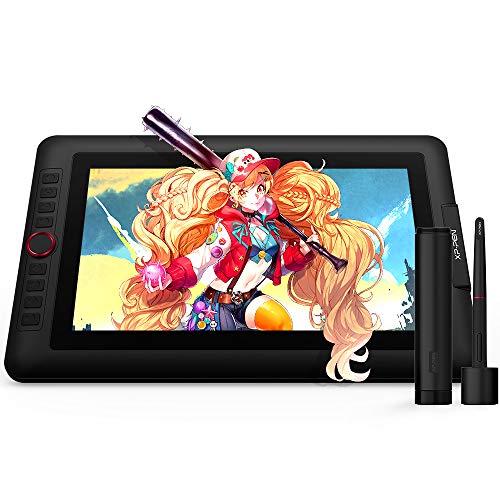
5. XP-PEN Artist13.3 Pro Drawing Tablet
The XP-PEN Artist13.3 Pro Drawing Tablet is a solid choice for illustrators seeking a portable and affordable drawing display, balancing essential features with a reasonable price. The XP-PEN Artist13.
✅ Pros
- 8192 pressure levels for detailed control
- Compact and portable design
- Full HD screen for clear visuals
- Eight customisable express keys for efficiency
❌ Cons
- Screen glare in bright environments
- Initial setup can be cumbersome
- Large bezel reduces screen space
👁️ Quick Review Summary
⚡ Performance
The Artist13.3 Pro offers 8192 levels of pressure sensitivity, which suggests fine control over brush strokes and line thickness. Its active area measures 13.3 inches diagonally, providing a decent workspace for detailed illustrations. The pen accuracy is generally praised in customer reviews, though some note occasional calibration adjustments are necessary. The screen quality, featuring a full HD resolution, delivers sharp visuals, though reflections can be an issue in brightly lit environments, as noted by some users.
🎨 Design
Constructed with durable materials, the Artist13.3 Pro is built to withstand regular use. Its compact design and lightweight nature make it highly portable, ideal for illustrators who work on the go. Ergonomically, the tablet is well-regarded, with a comfortable drawing posture facilitated by its adjustable stand. Aesthetically, it maintains a professional look, though some users mention the bezel is somewhat large, which might detract from the sleekness of the design.
🔌 Compatibility
XP-PEN provides solid driver support, ensuring compatibility with major software like Photoshop, Illustrator, and Clip Studio Paint. The tablet includes eight express keys, which are customisable for frequently used functions, enhancing workflow efficiency. Connectivity is straightforward, requiring a USB-C connection, although some users report initial setup can be a bit cumbersome. Regular driver updates are necessary to maintain compatibility, particularly with newer operating systems.
💰 Value
Priced at £269.99, the Artist13.3 Pro offers good value for those who need a middle-ground solution between basic tablets and high-end displays. It is a worthwhile investment for budding illustrators or those on a budget, providing essential features without excessive cost. However, professionals requiring ultra-precise colour calibration or larger workspaces might need to consider more expensive alternatives.
🎯 Verdict
A solid choice for illustrators seeking a portable and affordable drawing display, balancing essential features with a reasonable price.

6. Wacom One 12 drawing tablet
The Wacom One 12 drawing tablet is the wacom one 12 is a commendable choice for new digital artists seeking a reliable and affordable tablet, though more advanced users may require additional features. The Wacom One 12 drawing tablet is well-suited for budding illustrators and digital artists who are just beginning their journey into the world of digital art.
✅ Pros
- Affordable entry-level price point
- 8192 pressure levels for precise control
- 99% sRGB colour gamut for accurate colours
- Battery-free pen eliminates charging hassle
❌ Cons
- No express keys for quick shortcuts
- Occasional driver issues reported
- Limited active area for larger projects
👁️ Quick Review Summary
⚡ Performance
The Wacom One 12 offers 8192 levels of pressure sensitivity, which allows for a nuanced and precise drawing experience. The active area measures 11.6 inches, providing a sufficient workspace for detailed illustrations. Customer feedback highlights the pen accuracy as reliable, with minimal lag. The Full-HD display with 99% sRGB colour gamut ensures vibrant and true-to-life colours, which is crucial for accurate colour representation in professional work.
🎨 Design
Constructed with durable plastic, the Wacom One 12 is lightweight and portable, making it convenient for on-the-go use. Its ergonomic design is appreciated in reviews, as it reduces strain during long drawing sessions. The aesthetic is simple yet modern, appealing to those who prefer a minimalistic look. However, some users note that the lack of express keys may require additional keyboard use, which could disrupt workflow.
🔌 Compatibility
The Wacom One 12 is compatible with Windows, Mac, Chromebook, and Android devices, offering flexibility across platforms. It supports major software like Photoshop, Illustrator, and Clip Studio Paint, which are staples for illustrators. The inclusion of a battery-free EMR pen means no need for charging, enhancing convenience. However, some users report occasional driver issues, particularly with newer operating systems, which can be a hurdle for seamless integration.
💰 Value
Priced at £229.99, the Wacom One 12 offers a solid set of features for its cost. It is a worthwhile investment for beginners who need a reliable entry-level tablet without breaking the bank. Professionals or those seeking advanced features might consider higher-end models. The balance of price and performance makes it a strong candidate for those just starting out or needing a secondary device for travel.
🎯 Verdict
The Wacom One 12 is a commendable choice for new digital artists seeking a reliable and affordable tablet, though more advanced users may require additional features.
7. Wacom Intuos Pro Small
The Wacom Intuos Pro Small is for illustrators needing a compact and efficient tablet, the wacom intuos pro small offers a compelling balance of portability and performance. The Wacom Intuos Pro Small is ideal for illustrators who need a compact solution without sacrificing functionality.
✅ Pros
- 8192 pressure sensitivity levels for detailed work
- Compact and lightweight for easy transport
- Good compatibility with major creative software
- Customisable Express Keys enhance workflow
❌ Cons
- Limited active area might not suit all
- No built-in screen for direct drawing feedback
- Occasional driver updates needed
👁️ Quick Review Summary
⚡ Performance
The Intuos Pro Small features 8192 levels of pressure sensitivity, allowing for nuanced strokes and fine detail management. The active area measures 6.2 x 3.9 inches, which provides a balance between space and portability. Customer feedback suggests that the pen accuracy is impressive, offering precise control over brush strokes. Although it lacks a built-in screen, users report that the surface texture mimics paper, enhancing the drawing experience. This level of performance supports a variety of illustrative styles.
🎨 Design
Constructed with durable materials, the Wacom Intuos Pro Small is both lightweight and robust. Its compact size makes it easily portable, fitting comfortably into a laptop bag for travel. Users appreciate its ergonomic design, which includes a comfortable grip pen and a smooth surface. The tablet's aesthetic is sleek and professional, with a minimalist design that appeals to many creatives. This makes it a practical choice for illustrators who value both form and function.
🔌 Compatibility
The tablet is compatible with major software such as Photoshop, Illustrator, and Clip Studio Paint, ensuring versatility across different projects. It supports both Windows and macOS, with drivers that are generally reliable, though some users mention occasional updates are needed. The tablet includes Express Keys, which can be customised for shortcuts, enhancing workflow. Connectivity is straightforward with a USB connection, though some users would prefer wireless options.
💰 Value
Priced at £229.99, the Wacom Intuos Pro Small offers a solid set of features for its cost. It's well-suited for illustrators who require a portable yet capable drawing tool. Those needing a larger active area or built-in screen might consider other models. However, for artists prioritising space and mobility, this tablet presents good value. It's a worthwhile investment for those who need precision and portability.
🎯 Verdict
For illustrators needing a compact and efficient tablet, the Wacom Intuos Pro Small offers a compelling balance of portability and performance.

8. XPPen Artist13.3 Pro V2 Drawing Tablet
The XPPen Artist13.3 Pro V2 Drawing Tablet is for illustrators prioritising portability and colour accuracy, the xppen artist13. The XPPen Artist13.
✅ Pros
- 8192 pressure levels for detailed control
- Full-laminated screen reduces parallax
- 99% sRGB colour gamut for accurate colours
- 8 customisable shortcut keys for efficiency
❌ Cons
- No built-in stand affects ergonomics
- Occasional driver setup issues
- 3-in-1 cable may limit flexibility
👁️ Quick Review Summary
⚡ Performance
With 8192 levels of pressure sensitivity, the X3 Pro Smart Chip Stylus ensures precise control over line thickness and opacity, crucial for detailed illustrations. The active area of 13.3 inches provides ample space for working on intricate designs. Customer reviews highlight the full-laminated screen, which reduces parallax and improves accuracy. The 99% sRGB colour gamut ensures vibrant and accurate colours, essential for artists who require fidelity in their work.
🎨 Design
The tablet is constructed with durable materials, offering a solid feel while maintaining portability. At 13.3 inches, it is compact enough for travel yet provides a comfortable working area. The design includes 8 customisable shortcut keys, which enhance efficiency by allowing quick access to frequently used functions. Reviews suggest the tablet has an appealing sleek design, though some users note the absence of a stand, which could affect ergonomics during extended use.
🔌 Compatibility
The XPPen Artist13.3 Pro V2 is compatible with both Windows and macOS, and it supports major software such as Photoshop, Illustrator, and Clip Studio Paint. Driver support is generally reliable, though some users mention occasional setup difficulties. The 8 express keys are highly customisable, enhancing workflow efficiency. Connectivity is straightforward, with a 3-in-1 cable that consolidates power and data connections, though this could limit flexibility in cable management.
💰 Value
Priced at £229.49, the tablet offers a balanced mix of features and affordability. It’s an excellent option for budding professionals and seasoned illustrators needing a secondary device. However, those requiring a larger drawing area or advanced features might need to consider higher-end models. Despite a few limitations, the price is justified by the performance and colour accuracy it offers.
🎯 Verdict
For illustrators prioritising portability and colour accuracy, the XPPen Artist13.3 Pro V2 offers excellent value with a few minor drawbacks.

9. GAOMON PD1220 11.6’’ Pen Display 86% NTSC Full
The GAOMON PD1220 11.6’’ Pen Display 86% NTSC Full is for illustrators seeking portability and basic functionality at a reasonable price, the gaomon pd1220 is a solid choice, though professionals may require more advanced features. The GAOMON PD1220 is ideal for budding illustrators or graphic design students who require a portable yet capable pen display for digital illustration, branding, and light animation work.
✅ Pros
- 8192 levels of pressure sensitivity for detailed work
- Compact and lightweight, ideal for portability
- Full-laminated screen reduces parallax
- Tilt support for natural brush strokes
❌ Cons
- Occasional pen jitter at slow speeds
- Driver issues on Mac reported by users
- No express keys for shortcut customisation
👁️ Quick Review Summary
⚡ Performance
The GAOMON PD1220 offers 8192 levels of pressure sensitivity, which is a standard expectation for precise line work in detailed illustrations. The 86% NTSC full-laminated screen provides decent colour accuracy and reduces parallax, enhancing the drawing experience. Customers have noted the pen's accuracy, although some have mentioned occasional jitter at slow speeds. The tilt support is a welcome feature for achieving natural brush strokes, making it suitable for more nuanced artwork.
🎨 Design
Constructed from durable materials, the GAOMON PD1220 is lightweight and portable, weighing just 0.88 kilograms. Its charcoal grey finish offers a professional appearance, though some users have reported it feels somewhat plasticky. The ergonomic design includes a slight curve, which can aid in reducing wrist strain during extended sessions. Its compact design makes it easy to carry, though the smaller screen size might not suit those who prefer larger canvases for detailed work.
🔌 Compatibility
The GAOMON PD1220 is compatible with Windows, Mac, and Android, making it versatile across different operating systems. It supports major software like Photoshop, Illustrator, and Clip Studio Paint. However, users have occasionally reported driver installation issues on Mac, which might require some troubleshooting. It lacks express keys, which could be a drawback for those who rely on shortcut customisation for efficiency. Connectivity is through a USB-C, which is standard but requires adaptors for older ports.
💰 Value
At £219.58, the GAOMON PD1220 offers good value for those entering the digital art world or needing a secondary, portable device. Its features justify the price, especially for students or hobbyists. However, professional illustrators who need larger displays or more advanced features might look elsewhere. It balances affordability with essential functionality, making it a reasonable choice for those prioritising portability and basic performance.
🎯 Verdict
For illustrators seeking portability and basic functionality at a reasonable price, the GAOMON PD1220 is a solid choice, though professionals may require more advanced features.

10. Wacom Intuos Pro S Black
The Wacom Intuos Pro S Black is for illustrators needing a portable, precise drawing tablet, the wacom intuos pro s offers excellent performance, though its small size may not suit everyone. The Wacom Intuos Pro S is designed for professional illustrators and graphic designers who require precision and control in their work.
✅ Pros
- 8192 pressure sensitivity levels for detailed control
- Compact and lightweight design for easy portability
- Bluetooth connectivity reduces cable clutter
- Compatible with major creative software
❌ Cons
- Small active area may feel cramped for some
- Initial setup of express keys can be complex
- Higher price point for a small tablet
👁️ Quick Review Summary
⚡ Performance
The tablet boasts 8192 levels of pressure sensitivity, allowing for nuanced control over brush strokes and line thickness. The active area measures 160 x 100 mm, which, while small, offers sufficient space for detailed work without overwhelming your workspace. Customer reviews highlight the pen's accuracy and responsiveness, crucial for intricate illustrations. The lack of a screen may not appeal to all, but it ensures no glare or calibration issues, keeping the focus on pen precision.
🎨 Design
Constructed from high-quality materials, the Wacom Intuos Pro S is built to withstand regular use, with a sleek, modern design that appeals to professionals. Its compact and lightweight form factor enhances portability, making it easy to slip into a laptop bag. The ergonomics are well-regarded, with a comfortable surface for long drawing sessions, though some users note the small size may feel cramped for those accustomed to larger tablets.
🔌 Compatibility
The tablet is compatible with both Windows and Mac operating systems, ensuring broad usability. It supports major software like Adobe Photoshop, Illustrator, and Clip Studio Paint, making it versatile for various creative tasks. The inclusion of Bluetooth connectivity allows for a wireless setup, reducing cable clutter. Express keys are programmable, offering custom shortcuts to speed up workflow, though some users find setting them up initially can be slightly complex.
💰 Value
At £217.34, the Wacom Intuos Pro S is a significant investment for its size, but its features justify the price for professionals needing precision and portability. It's ideal for those starting in professional illustration or needing a secondary device for travel. However, those needing a larger workspace or built-in display might look elsewhere. The tablet's build quality and performance make it a reliable tool for serious illustrators.
🎯 Verdict
For illustrators needing a portable, precise drawing tablet, the Wacom Intuos Pro S offers excellent performance, though its small size may not suit everyone.

11. XPPen Artist 12 Drawing Tablet
The XPPen Artist 12 Drawing Tablet is for illustrators seeking a portable and affordable drawing solution, the xppen artist 12 (2nd gen) delivers a dependable performance and vibrant display quality. The XPPen Artist 12 (2nd Gen) Drawing Tablet is ideal for budding illustrators and seasoned professionals working on book illustrations, branding projects, or digital media design.
✅ Pros
- 8192 pressure levels for detailed work
- Full-laminated screen reduces parallax
- 127% sRGB colour gamut for vibrant colours
- Compatible with major operating systems and software
❌ Cons
- Occasional pen calibration needed
- Express keys could be more tactile
- Initial driver setup can be tricky
👁️ Quick Review Summary
⚡ Performance
With 8192 levels of pressure sensitivity, the XPPen Artist 12 provides a responsive drawing experience, allowing for nuanced line work and shading. The 11.9-inch full-laminated screen reduces parallax, enhancing pen accuracy. The 127% sRGB colour gamut ensures vibrant, true-to-life colours, a crucial feature for professional digital artists. Customer reviews highlight the screen's clarity and the pen's precision, although some note occasional calibration adjustments are necessary to maintain accuracy.
🎨 Design
The tablet's sleek design features a durable build with quality materials, providing a comfortable drawing experience. Its compact size and lightweight nature (weighing approximately 0.7 kg) enhance portability, making it easy to transport. Ergonomically, it includes adjustable express keys for customisation, although some users mention the buttons could be more tactile. The aesthetic appeal, with its Le Petit Prince Edition design, adds a unique touch, though could be considered too whimsical for some professional environments.
🔌 Compatibility
The XPPen Artist 12 is compatible with Windows, Mac OS, Chromebook, and Android, offering versatile connectivity through a USB-C port. It supports major software like Photoshop, Illustrator, and Clip Studio Paint, ensuring seamless integration into existing workflows. The drivers are generally reliable, though some users report minor initial setup challenges. The express keys offer customisable shortcuts, enhancing productivity for complex projects.
💰 Value
Priced at £209.99, the XPPen Artist 12 offers excellent value for its features, making it a solid choice for students and professionals seeking an affordable yet capable pen display. However, those requiring a larger screen or more advanced features might look elsewhere. Overall, it offers a compelling package for artists prioritising portability and performance within a budget.
🎯 Verdict
For illustrators seeking a portable and affordable drawing solution, the XPPen Artist 12 (2nd Gen) delivers a dependable performance and vibrant display quality.
12. UGEE 15.4 inch Drawing Tablet
The UGEE 15.4 inch Drawing Tablet is for illustrators seeking vibrant colour and detailed control on a budget, the ugee ue16 is a practical choice, though those needing wireless options might consider alternatives. The UGEE 15.
✅ Pros
- High 16K pressure sensitivity for detailed work.
- 143% sRGB for vibrant colour accuracy.
- Large active area of 15.4 inches.
- Lightweight and portable design.
❌ Cons
- Slight parallax effect noted by some users.
- Build materials feel slightly plasticky.
- Limited to wired connectivity options.
👁️ Quick Review Summary
⚡ Performance
With 16,000 levels of pressure sensitivity, the UGEE UE16 offers a high degree of responsiveness, allowing for nuanced line work and shading. The active area of 15.4 inches provides ample space for detailed illustrations. Customers have noted the accuracy of the battery-free stylus, which enhances the drawing experience. The screen, boasting 143% sRGB, offers vibrant and true-to-life colours, although some users mention a slight parallax effect due to the screen design. Overall, the performance metrics align well with the needs of detailed digital artwork.
🎨 Design
The UGEE UE16 is built with a sleek, modern aesthetic featuring a full-laminated screen that reduces glare and improves viewing angles. The tablet's body is lightweight and portable, weighing in at just over 1kg, which is convenient for artists on the move. The inclusion of 8+1 hot keys enhances ergonomic use, though some users have reported that the build materials feel slightly plasticky, which might not inspire confidence in long-term durability.
🔌 Compatibility
The UGEE UE16 supports a wide range of operating systems, including PC, Windows, Mac, and Android, making it versatile in terms of device compatibility. It works seamlessly with major software like Photoshop, Illustrator, and Clip Studio Paint. The tablet's driver support is generally reliable, though some users have experienced occasional driver installation issues. The express keys are customisable, which is helpful for streamlining workflow, but connectivity is limited to wired options, which might be less convenient for some users.
💰 Value
At £204.55, the UGEE 15.4 inch Drawing Tablet offers a compelling blend of features for its price. The high-pressure sensitivity and vibrant screen make it a strong contender for budget-conscious artists who still require quality performance. However, those seeking wireless connectivity or more premium build materials might need to look elsewhere. Ideal for students and emerging professionals, this tablet provides substantial value without a hefty price tag.
🎯 Verdict
For illustrators seeking vibrant colour and detailed control on a budget, the UGEE UE16 is a practical choice, though those needing wireless options might consider alternatives.
📖 Buying Guide
When choosing premium digital art tablets under £300, consider these key factors:
- Price vs Features: Budget tablets can still offer 8192 pressure levels and good build quality. Focus on essential features rather than premium extras.
- Professional Features: Look for 4K displays, wide colour gamut (90%+ sRGB), and advanced pen technology with tilt recognition.
- Screen Quality: Full HD (1920x1080) minimum for professional work. Look for 90%+ sRGB colour gamut. Full lamination reduces parallax for better accuracy.
- Pressure Sensitivity: Look for 8192 levels for professional work. 4096 levels work well for beginners. Higher sensitivity allows for more nuanced brush strokes and line variation.
- Screen Size: 13-16" portable for travel, 22-24" ideal for studio work. Larger screens reduce eye strain and allow for detailed illustration work.
- Connectivity: USB-C offers single-cable solution. HDMI + USB more universal. Check if your computer supports the required connections.
- Stand & Ergonomics: Adjustable stand (15-90°) prevents neck strain. Anti-glare coating reduces eye fatigue during long sessions.
- Software Compatibility: Ensure driver support for your OS (Windows, Mac, Linux). Check compatibility with your preferred software (Photoshop, Illustrator, Clip Studio Paint, etc).

About the Reviewer
Every Big Red Illustration review is written by illustrator and agent Jamie Conner, drawing on over 30 years of combined professional experience in traditional art, digital tools, and the wider creative industry.
Here's what he has to say…
I'm Jamie Conner, a UK-based illustrator and illustrator agent with a background in character-focused and expressive artwork. My training began at Newcastle-under-Lyme College and continued at Nottingham Trent University, where I developed a strong foundation in illustration.
I now split my time between creating my own work and representing artists, supporting them with commissions, opportunities, and navigating the wider creative industry. I also review digital and traditional art products, offering clear, practical insights to help artists choose tools that suit their workflow.
Whether I'm illustrating, advising artists, or reviewing products, my work is driven by a genuine commitment to the craft of illustration and to the wider creative community.